VLC is free, open source, already installed on millions of computers, and it plays an IPTV M3U playlist with no extra software. It is not the fanciest IPTV player — there is no TV-guide grid — but for quickly testing a new subscription, watching on a laptop, or checking whether a problem is the app or the stream, it is hard to beat.
Here is how to watch IPTV on VLC on Windows, Mac, Android, iPhone and Linux, plus fixes for the errors almost everyone runs into once.
Quick takeaways
- VLC opens IPTV through an M3U link: Media → Open Network Stream on Windows, File → Open Network on Mac.
- Press Ctrl+L on Windows (Window → Playlist on Mac) to see and switch channels.
- VLC has no TV-guide grid or catch-up; for everyday TV, use a dedicated IPTV player.
- If streams stutter, raise Network caching to 3000–5000 ms.
What you need
- VLC media player, downloaded from the official site, videolan.org, or your phone’s app store. Avoid download mirrors that bundle extra software.
- Your M3U link from your IPTV provider.
If you only have an Xtream Codes login (a server URL, username and password), most servers will build the M3U link from it. Replace the capitals with your own details:
http://SERVER:PORT/get.php?username=USER&password=PASS&type=m3u_plus&output=tsHow to watch IPTV on VLC for Windows
- Open VLC.
- Click Media → Open Network Stream (or press Ctrl+N).
- Paste your M3U link into the box marked “Please enter a network URL”.
- Click Play. VLC loads the playlist and starts the first channel.
- Press Ctrl+L (or View → Playlist) to see every channel. Double-click one to switch, or use the search box at the top.
Tip: once the list is loaded, use Media → Save Playlist to File (Ctrl+Y). Next time you can open that file instead of pasting the link again.
How to watch IPTV on VLC for Mac
- Open VLC.
- Click File → Open Network (or press Cmd+N).
- Paste your M3U link into the URL field.
- Click Open.
- Open Window → Playlist to browse and switch channels.
On Android phones, tablets and Android TV
- Install VLC for Android from the Google Play Store.
- Open the More tab, then New stream (labelled Stream or Network stream in some versions).
- Paste the M3U link and tap the arrow to open it.
On a phone, a dedicated player such as IPTV Smarters Pro is nicer for daily use because it shows the guide and remembers your place; see our Smarters Pro setup guide.
On iPhone and iPad
- Install VLC for Mobile from the App Store.
- Open the Network tab and tap Open Network Stream.
- Paste the M3U link and tap Open Network Stream again.
Very large playlists can take a while to load on a phone. If it stalls, ask your provider for a smaller, filtered M3U (for example UK channels only).
On Linux
The desktop menus are the same as on Windows: Media → Open Network Stream. From a terminal you can also open a link directly:
vlc "http://SERVER:PORT/get.php?username=USER&password=PASS&type=m3u_plus&output=ts"Opening a downloaded M3U file instead
If your provider sent an .m3u file rather than a link, use Media → Open File (Ctrl+O), or simply drag the file onto the VLC window. Bear in mind a file is a snapshot: if the provider changes servers, the file stops working while the link keeps updating, so the link is the better option when you have both.
Fixing common VLC IPTV problems
“Your input can’t be opened: VLC is unable to open the MRL”
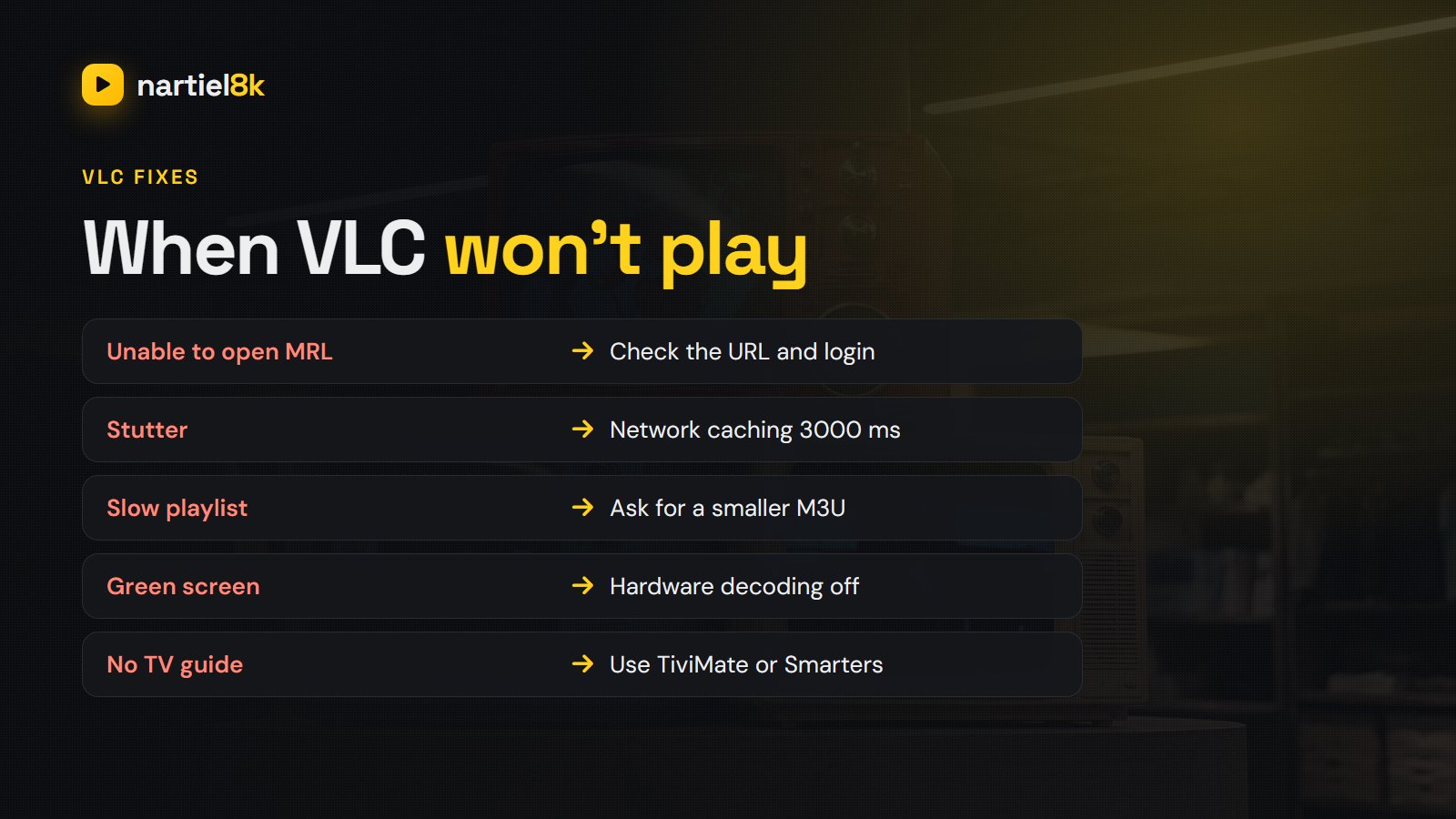
VLC could not reach the link. Check for a typo or a missing character, make sure your subscription is active, and close the stream on any other device in case you have hit your connection limit. Pasting the link into a web browser is a quick test: if a file starts downloading, the link is fine. If the playlist opens but one channel will not, try swapping output=ts for output=m3u8.
Stuttering or buffering
Give VLC a bigger buffer. On Windows go to Tools → Preferences, click All under “Show settings” at the bottom left, open Input / Codecs and raise Network caching (ms) from 1000 to 3000–5000. On a Mac, the same setting is under VLC’s Settings with “Show All” turned on. If that does not help, the issue is the connection; see the IPTV buffering fixes.
The playlist takes ages to load, or VLC freezes
VLC is not built for playlists with tens of thousands of entries. Ask your provider for a filtered M3U with only the countries or categories you want, or use a player designed for big lists such as TiviMate or IPTV Smarters Pro.
Sound but no picture, or a green screen
Usually a hardware decoding glitch. In Tools → Preferences → Input / Codecs, set Hardware-accelerated decoding to Disable, restart VLC and try again.
VLC’s limits for IPTV (and when to switch)
VLC plays streams very well, but it is a media player, not a TV app. It has no guide grid, so you cannot see what is on next (see what EPG is), no catch-up, no favourites groups beyond saving playlists, no parental lock, and it is awkward with a TV remote. For the living room, a dedicated player is much better — our round-up of the best IPTV player apps compares the main ones.
Casting from VLC to your TV
Desktop VLC can send video to a Chromecast through Playback → Renderer, and VLC for Android has a cast button. It works, but VLC may convert the stream on the fly, so quality and smoothness vary. A streaming stick running a proper IPTV app on the TV itself is more reliable; see the best devices for IPTV.
Want to test a line in VLC right now? Nartiel8K’s free 24-hour trial includes an M3U link that opens in VLC straight away.
Frequently asked questions
Yes. VLC opens IPTV M3U playlists on Windows, Mac, Linux, Android and iPhone. Use Media, Open Network Stream on Windows or File, Open Network on Mac, and paste your M3U link.
It is great for testing a subscription and for watching on a computer. For everyday TV it lacks a guide grid, catch-up and remote-friendly menus, so a dedicated IPTV player is better.
No. VLC shows the channel list but not an EPG grid with programme times. Use TiviMate, IPTV Smarters Pro or another IPTV player for that.
VLC could not reach the link. Check the link for typos, make sure your subscription is active, close other devices using the line, and try output=m3u8 instead of output=ts.
Not directly, but most servers build an M3U link from it in this format: http://SERVER:PORT/get.php?username=USER&password=PASS&type=m3u_plus&output=ts.
Yes. VLC is free and open source. Download it from videolan.org or your device’s official app store, not from third-party download sites.